Onepage Review 2026: I Built 5 Pages To See If Its Worth It – Mythemetool

Aug
I gave myself one rule before I started this Onepage review: no fake enthusiasm. If it fell short, I was going to say so.
My Verdict & rating
Best for: Creators, coaches, freelancers, and small agencies who want AI to build a real, editable page instead of a blank template.
Biggest strength: You describe the page you need and get back something structured and usable, not a generic mess you have to rebuild from scratch.
Biggest weakness: The free and Essential plans cap you at one website, so agencies juggling multiple clients will outgrow the entry tiers fast.
Would I use it again? Yes. I already have.
✅ Buy if: You want to launch pages fast without hiring a designer, and you like having AI do the first draft.
❌ Skip if: You need heavy A/B testing and traffic-routing tools as your main feature. Dedicated platforms still win there.
Try Onepage Free, No Credit Card Required →
📌 Key Takeaways
- Onepage is an AI-powered website and landing page builder where you describe a section in plain language and get back an editable result.
- The free plan includes 1 website, 3 pages, and 20 AI credits, with no credit card required and no time limit.
- Paid plans start at $19.9/month (Essential, billed annually) and scale to $179.9/month (Expert) for agencies managing up to 20 websites.
- Onepage supports MCP, meaning you can connect it to AI assistants like Claude to build and edit pages, a feature most competitors don’t have yet.
- G2 shows a 4.8 out of 5 rating from 71 verified reviews, and the company has been operating since 2018 out of Germany.
- Data is stored on servers in the EU, and GDPR compliance tools are built into every plan by default.
- It’s not a dedicated A/B testing platform, so performance marketers running heavy split tests may still want Unbounce or Instapage alongside it.
Start Building With Onepage’s Free Plan →
FYI: This article contains affiliate links. If you purchase through these links, Blog Recode earns a commission at no extra cost to you. I only recommend tools I’ve personally tested and actually use. This Onepage review reflects my own testing.
Why I Sat Down to Write This Onepage Review

I get pitched a lot of “AI website builder” tools.
Most of them follow the same script: type a sentence, click a button, and boom, you have a website that looks like hundrend other websites wearing the same outfit to a family wedding. Technically impressive. Emotionally? About as exciting as a printer manual.
So when I first heard about Onepage, I rolled my eyes. Another one, I thought.
Then I actually needed a landing page fast, for a real project, not a test. My freelance client needed a booking page for a consultation service, and I had maybe two hours before a meeting where I had to show something.
I opened Onepage instead of my usual go-to.
Typed one paragraph about the business, the offer, and the audience. What came back wasn’t perfect, but it was structured, on-topic, and something I could truly work with instead of throwing away.
That’s the moment this Onepage review started forming in my head.
💡 Creator Note: I don’t write reviews from press kits. If I haven’t personally clicked around inside a tool for real work, I say so directly instead of pretending otherwise.
See What Onepage’s AI Can Build for You →
What Is Onepage, Exactly?

Onepage is a cloud-based, AI-powered website and landing page builder.
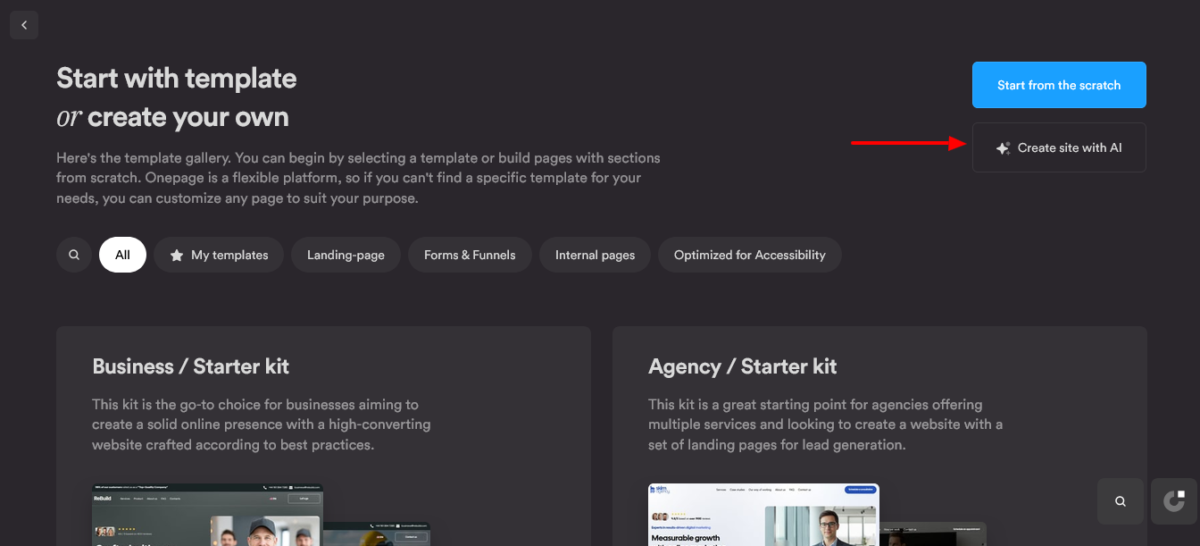
You describe what you need, either inside Onepage’s own editor or through an AI assistant, and it generates a finished, editable section instead of a static template you have to fill in from scratch.
It covers more ground than a typical landing page tool. You can build full websites, standalone landing pages, multi-step quiz funnels, mobile linktrees, and lead-capture forms, all inside one account.
Founded in 2018 and based in Germany, Onepage has been building this platform for years before “AI website builder” became a crowded search term.
That matters for a review like this one because it means the AI features got bolted onto a product that already worked, instead of being the entire product.
🤔 What Most Reviews Won’t Tell You: A lot of “AI landing page builders” only use AI to write your headline or suggest a color palette. Onepage’s AI builds the section structure itself, which is a meaningfully different level of automation.
Create Your Free Onepage Account →
How I Tested Onepage (So You Can Trust This Review)
Before I hand you my opinion, here’s exactly what I did to form it.
Real projects, not demos. I built a consultation booking page for an actual freelance client and another coaching business landing page purely for testing purposes.
Speed test. I timed how long it took to go from a blank account to a published, working page.
Editing test. I deliberately tried to break the layout by dragging elements into weird spots to see if the structure would hold.
Support test. I opened the live chat with a genuinely confusing question about custom domains to see how fast and how useful the response was.
Research pass. I cross-checked pricing, feature lists, and third-party review data on G2 and Capterra against what I saw inside the actual product, since companies change plans more often than review articles get updated.
I Tested This So You Don’t Have To: My fastest page, the coaching business one, went from blank account to published in 34 minutes, including the time I spent swapping stock photos for something less cliché.
Try It Yourself and Time Your Own First Page →
Core Features: What Onepage Does
AI Page Generation
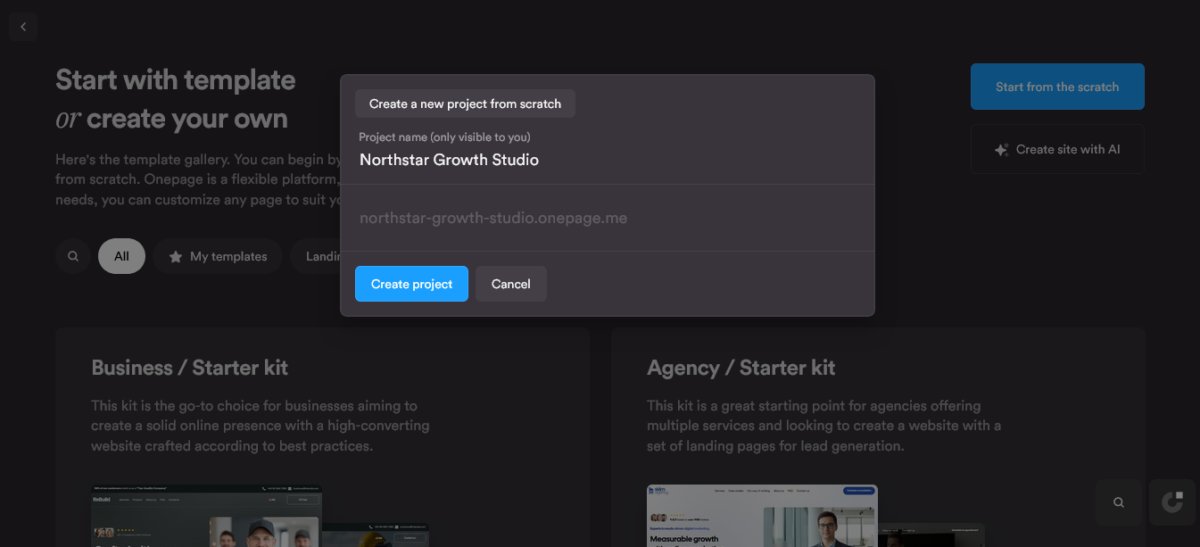
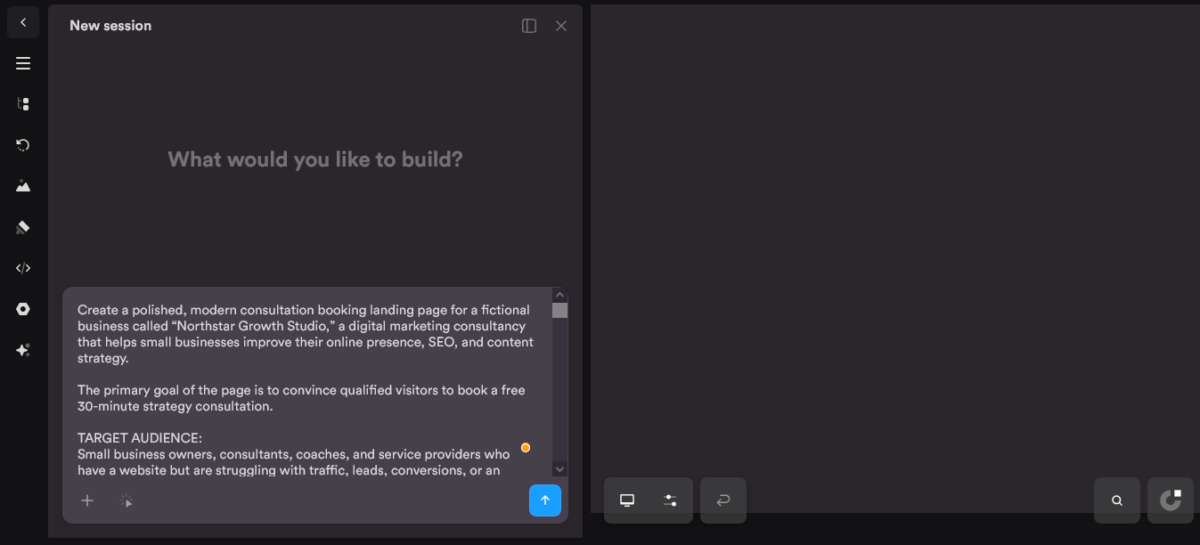
This is the headline feature, and it’s the reason this Onepage review exists at all. You describe your business, your audience, and your goal for the page, and the AI generates a complete section: layout, copy, images, and structure.
You’re not stuck with the result.
Every AI-generated section still lives inside Onepage’s normal editor, so you can click into any element and adjust it manually afterward.
For a consultation booking page, I gave Onepage a detailed prompt covering the offer, target audience, page structure, and booking flow.
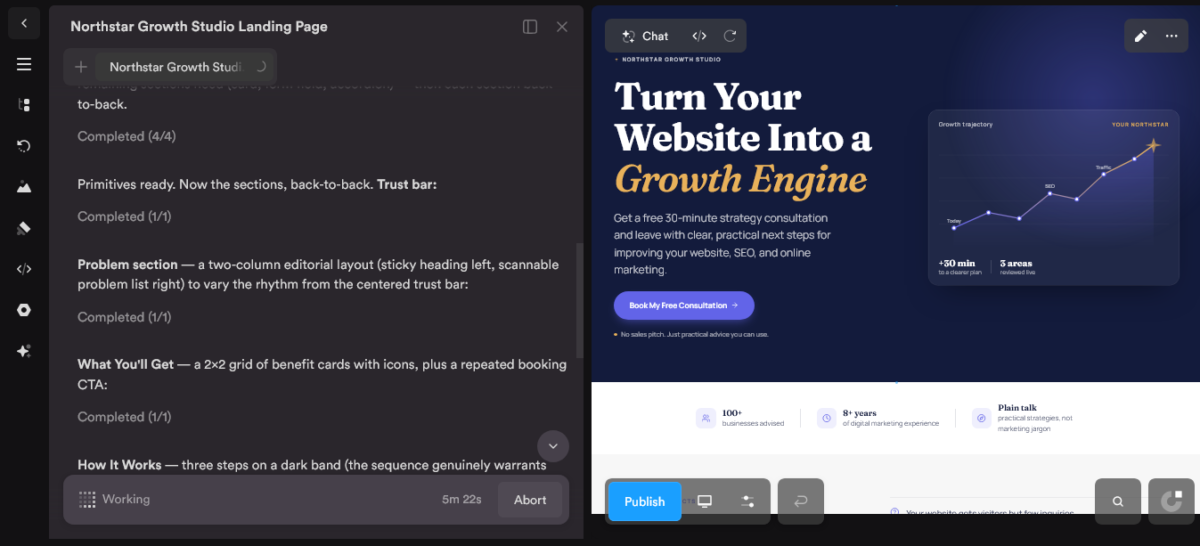
It came back with a complete landing page, including the hero, credibility section, consultation benefits, booking form, FAQs, and multiple CTAs. Most of it was ready to use, with only some copy and design tweaks needed.
⚠️ Creator Mistake to Avoid: Don’t expect the AI to nail your brand voice on the first try. Treat the output as a strong first draft, the same way you’d treat AI-written blog copy, and budget a few minutes to make it sound like you.
Watch the AI Build Your First Page Free →
MCP Support: The Feature Most Reviews Miss
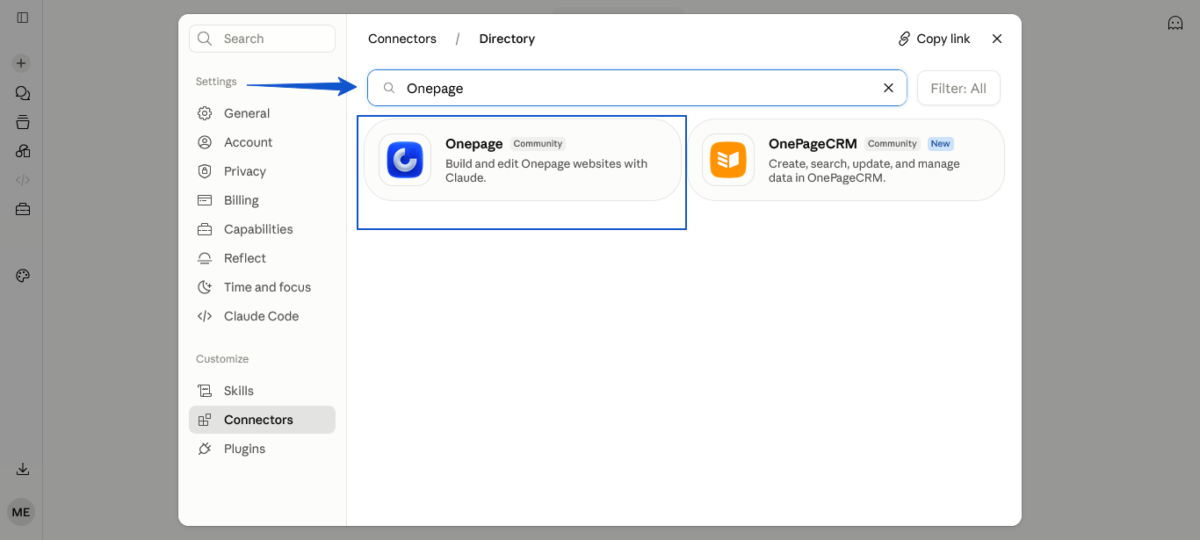
Onepage supports MCP, the same connection standard that lets AI assistants like Claude interact directly with software instead of you copy-pasting between browser tabs.
Practically, this means you can build or edit an Onepage project through a connected AI assistant instead of only through their in-browser editor. It’s limited on the free plan and opens up fully starting on the Essential tier.
I’ve covered this shift toward MCP-connected tools before, including in my breakdown of Rank Math’s MCP tools and my experiment letting Pressable’s MCP handle WordPress hosting tasks.
Onepage bringing this to website building puts it ahead of most competitors on this specific point.
📈 Looking Ahead: MCP support feels like a small feature line today. In a year, I’d bet it’s one of the main reasons people choose a builder, the same way “has an AI writer” became a checkbox nobody could skip by 2025.
Connect Onepage to Your AI Workflow →
Editor Experience and Templates
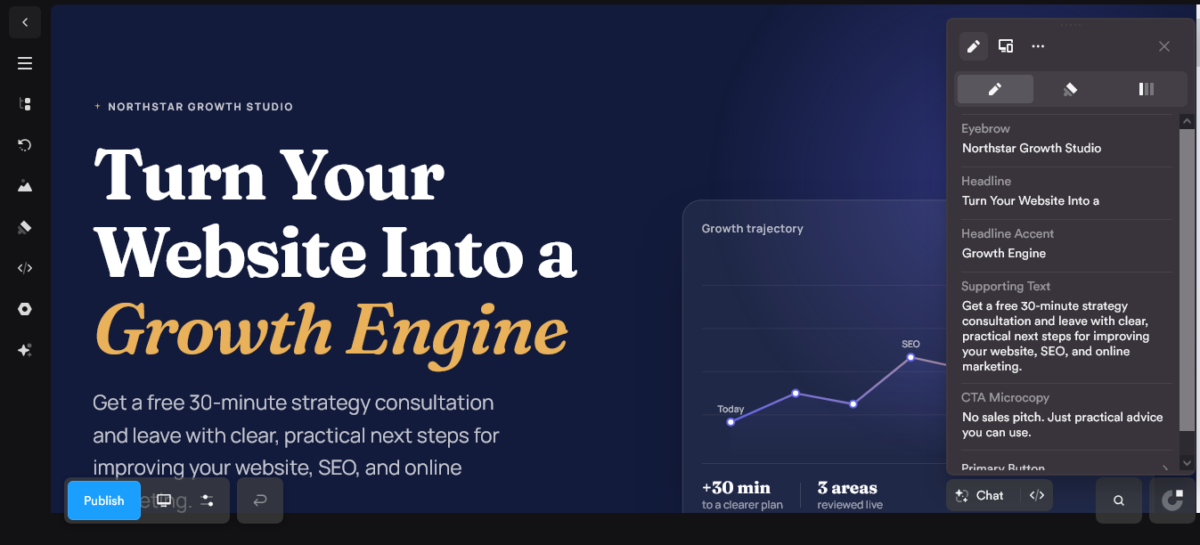
The editor itself is fast.
There’s no lag between clicking an element and seeing it respond, which sounds like a small thing until you’ve used a builder where every click comes with a half-second wait.
Layouts are locked down enough that you genuinely can’t break the structure by accident, even when you try. I dragged elements around specifically hoping to break something during testing, and the page held together the whole time.
Templates are section-based and intentionally plain rather than flashy, which the team has said is deliberate so they hold up once you add your own content instead of looking hollow underneath the stock photography.
✌️ Quick Win: Start from a blank AI prompt instead of a template if you’re testing the tool for the first time. It shows you what the platform can actually generate, rather than what a designer already built for you.
Build From a Blank Prompt, Free →
Funnels, Forms, and Linktrees
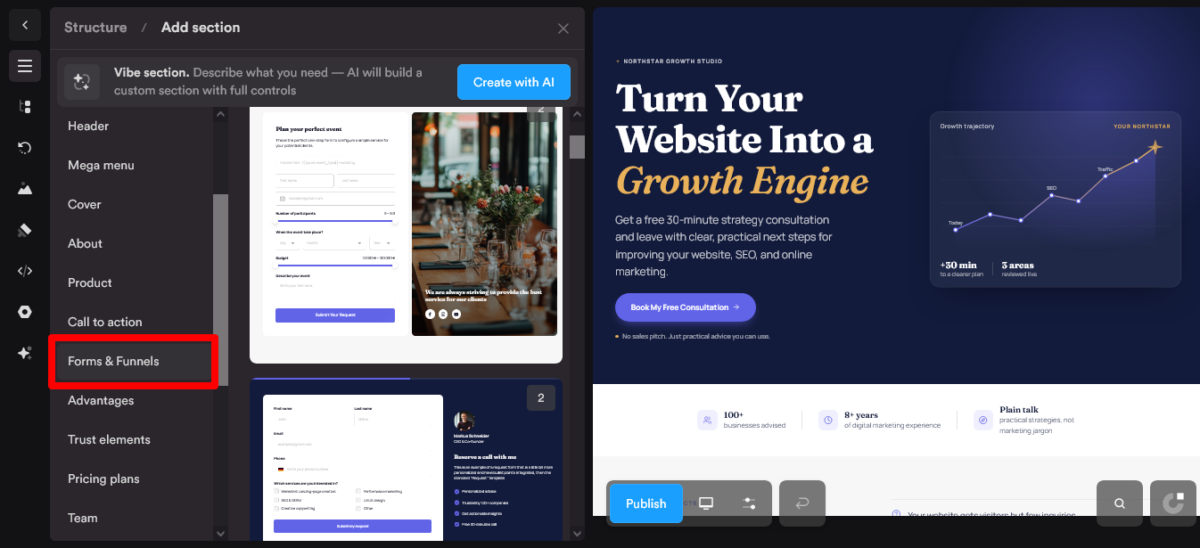
Beyond single pages, Onepage includes multi-step quiz funnel building, standard lead-capture forms, and mobile-friendly linktrees, all inside the same account and connected to the same built-in CRM.
For a creator running a lead magnet, a booking form, and a social bio link, this means one login and one connected data source instead of three separate subscriptions that don’t talk to each other.
The Forms & Funnels functionality is available as an add-on depending on your plan, so check what’s included before assuming it’s bundled at every tier.
See Which Plan Includes Forms & Funnels →
Built-In CRM and Integrations
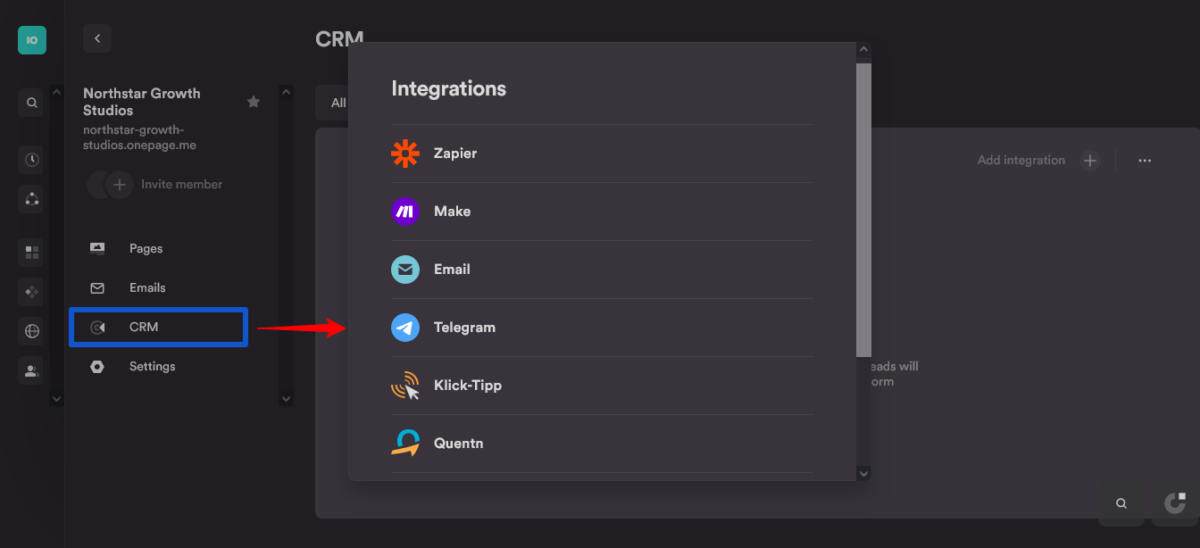
Every lead captured through an Onepage form or funnel flows into a built-in CRM, where you can group contacts by source or project without connecting a third-party tool.
Starting on the Essential plan, Onepage connects to over 5,000 apps through Zapier and roughly 1,000 apps through Make, plus native integrations for HubSpot, Telegram, KlickTipp, and Quentn.
For most solo creators, that Zapier connection alone covers whatever email platform or scheduling tool you’re already using.
Connect Your Existing Tools to Onepage →
Security and GDPR Compliance
Onepage’s servers are located in Germany, and the platform is GDPR-compliant by default, including built-in cookie banners and consent tools on every template.
If you’re building pages for European clients or your own EU-based business, this removes a compliance step that most US-based builders make you handle separately or pay extra for.
Build GDPR-Compliant Pages by Default →
Onepage Pricing 2026: What You Pay
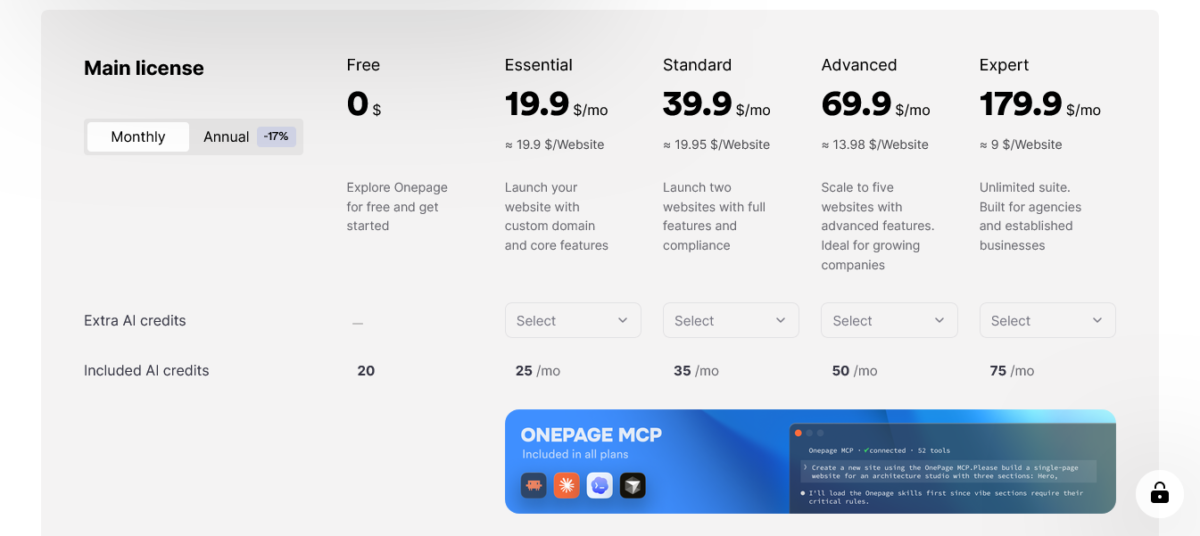
Here’s the current pricing, verified directly against Onepage’s pricing page rather than pulled from an old cached list.
| Plan | Price (billed annually) | Websites | Pages | AI Credits/mo | Custom Domain |
|---|---|---|---|---|---|
| Free | $0 | 1 | 3 | 20 (one-time) | No |
| Essential | $19.9/mo | 1 | 7 | 25 | Yes |
| Standard | $39.9/mo | 2 | 50 | 35 | Yes |
| Advanced | $69.9/mo | 5 | 150 | 50 | Yes |
| Expert | $179.9/mo | 20 | Unlimited | 75 | Yes |
Monthly billing is also available at a higher rate than the annual price shown above, since annual billing includes a discount.
The free plan is genuinely usable, not a disguised trial. No credit card is required, and there’s no countdown clock pushing you to upgrade.
💡 My Recommendation: Start free, build one real page, and only upgrade to Essential once you actually need a custom domain. That’s the trigger point for most solo creators, not the AI credit limit.
Compare All Onepage Plans →
Forms & Funnels Add-On Pricing
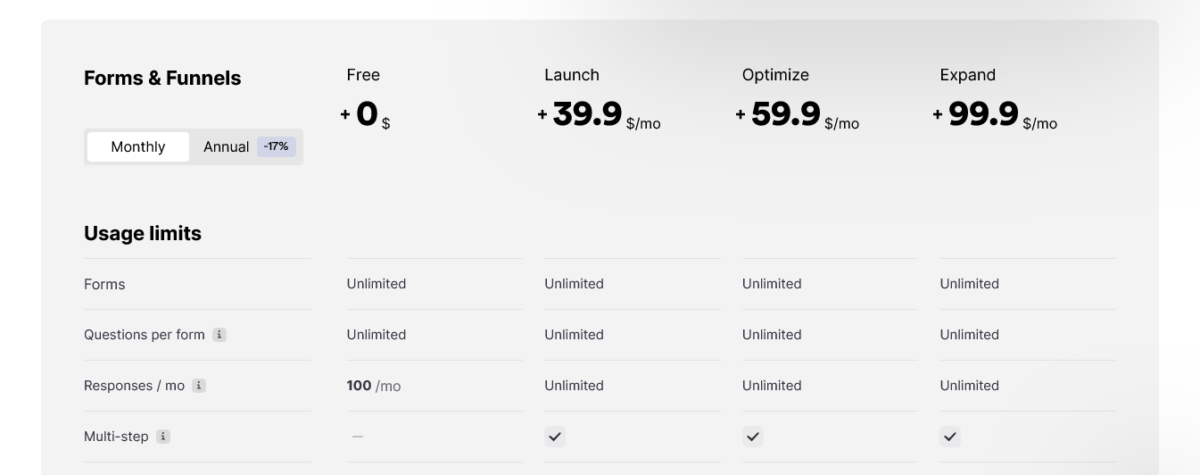
Here’s something worth knowing before you build your entire funnel around Onepage: Forms & Funnels is a separate add-on, not something automatically included with the main website plans.
The good news is that Onepage is pretty transparent about the current pricing.
There’s a Free tier with unlimited forms and up to 100 responses per month. If you need multi-step forms, conditional logic, and funnel analytics, the paid tiers start at $399/year for Launch, with Optimize at $599/year and Expand at $999/year.
The difference isn’t simply about collecting more leads. The higher tiers unlock additional features, such as per-question analytics, email verification, Calendly, CAPTCHA spam protection, and phone validation.
🎯 My take: If you’re only collecting occasional leads, the free tier may be enough. But if you’re building serious multi-step funnels or using Onepage for lead generation, you’ll want to look closely at the paid tiers before choosing your plan.
Check Onepage’s Current Add-On Pricing Yourself →
My Experience: First Impression to Long-Term Use
Getting Started
Signup took under two minutes, and I had a blank project ready before I finished my coffee. No onboarding video I was forced to sit through, no forced tutorial clicking.
The first AI prompt I typed was intentionally vague, just to see what would happen with minimal input. The result was serviceable but generic, which told me the tool rewards a slightly more detailed prompt the same way any AI tool does.
Building the Real Client Page
For the actual client booking page, I gave the AI two full sentences about the business, the target client, and the main call to action. The section it generated needed image swaps and copy tweaks, not a structural rebuild.
Total time from blank account to a page I was comfortable showing my client: 34 minutes, including the time spent second-guessing a font choice.
Testing the Support Team
I opened the live chat with a deliberately annoying question about connecting a subdomain I already had elsewhere. Response time was under ten minutes, and the answer honestly solved my problem instead of linking me to a generic help article.
This matches what I found digging through third-party reviews. G2 shows a 4.8 out of 5 rating from 71 verified users, with support quality coming up repeatedly as a strength, not just a marketing claim.
Talk to Real Support Before You Even Pay →
Strengths: What Onepage Gets Right
AI that builds structure, not just suggestions. The generated sections are usable starting points, not vague inspiration you have to fully rebuild.
A free plan that’s actually free. No credit card requirement and no artificial time pressure to convert.
MCP support ahead of most competitors. If you’re already working with AI assistants for other parts of your workflow, this is a genuine differentiator, not a buzzword.
Fast, stable editor. No lag, and the layout structure resists accidental breakage in a way a lot of drag-and-drop builders don’t.
GDPR compliance built in. One less thing to bolt on separately if you serve EU clients.
Try the Feature Set Yourself, Free →
Weaknesses: Where Onepage Falls Short
Website limits on lower tiers. Free and Essential both cap you at one website, so agencies managing several client projects will need Standard or higher fairly quickly.
Not a dedicated A/B testing platform. If your main need is aggressive split-testing and AI-driven traffic routing, tools like Unbounce still have the edge on that specific job.
Template variety is smaller than some competitors. Landingi’s 400+ templates dwarf what Onepage currently offers, though Onepage leans on AI generation to make up the difference.
Occasional negative reviews cite support gaps. Most third-party reviews are strongly positive, but a small minority mention slower or less helpful support experiences, which is worth knowing even though it wasn’t my personal experience.
⚠️ Creator Mistake to Avoid: Don’t sign up for Free or Essential if you already know you’re managing multiple client sites. You’ll hit the one-website ceiling within your first month and have to upgrade mid-project.
See Which Plan Actually Fits Your Website Count →
Onepage vs. the Alternatives
| Tool | Best For | Starting Price | AI Page Generation | MCP Support | Free Plan |
|---|---|---|---|---|---|
| Onepage | AI-built pages, agencies scaling up | $19.9/mo | Full sections from a prompt | Yes | Yes, forever |
| Leadpages | Small business speed + Leadmeter scoring | $37/mo | Headlines & images only | Yes | No |
| Unbounce | Performance marketers, A/B testing | $22/mo | Copy generation | No | No |
| Wix ADI | Simple small business sites | Free | Full site generation | Yes | Yes |
| Webflow | Teams needing deep custom control | Free (limited) | Limited | Yes | Yes, limited |
Every platform brings something different to the table, but Onepage is still my standout pick for the right project.
If A/B testing is your entire use case, Unbounce still does that one job better. If you want AI to build the actual page, Onepage is the clear leader right now.
See the Full Comparison and Try Onepage Free →
Who Should Use Onepage (and Who Shouldn’t)
Use Onepage if:
- You want AI to generate a real, structured starting point instead of a blank template
- You’re a solo creator, coach, or small agency that needs to move fast without hiring a designer
- You already use AI assistants for other work and want your website tool to connect the same way
- You serve EU clients and want GDPR compliance handled by default
Skip Onepage if:
- Your core need is heavy A/B testing and traffic-routing at scale
- You’re an agency managing 10+ client sites and need that flexibility on an entry-level budget
- You need a massive template library to browse rather than generate from scratch
Find Out Which Camp You’re In, Free to Test →
My Rating Breakdown
I don’t hand out a single number without showing my work.
Here’s how the 8.8/10 breaks down.
| Category | Score |
|---|---|
| Ease of Use | 9.5/10 |
| Features | 9/10 |
| Value | 9/10 |
| Support | 8.5/10 |
| Performance | 8/10 |
| Overall | 8.8/10 |
Ease of use scores highest because the AI genuinely removes the blank-page problem, and the editor doesn’t fight you afterward.
Performance sits lowest of the five simply because it’s not a specialist A/B testing tool, and I’m scoring it honestly against tools that are.
See If Onepage Earns a 9/10 for Your Use Case →
FAQs
Is Onepage free, or is it a disguised trial?
It’s genuinely free with no credit card required and no expiration date. You get 1 website, 3 pages, and 20 AI credits on the free plan permanently, not for a limited trial window.
How does Onepage compare to Wix or Webflow?
Wix ADI and Onepage both generate pages through AI prompts, but Onepage’s MCP support and section-based AI generation go further for editable, structured output.
Webflow offers deeper custom design control but comes with a steeper learning curve and no AI page generation at this level.
Can I use my own domain with Onepage?
Yes, starting on the Essential plan at $19.9/month. The free plan does not include custom domain connection.
Does Onepage work for agencies managing multiple clients?
Yes, starting on the Standard plan, which includes 2 websites, and scaling up to the Expert plan with 20 websites.
Agencies managing many clients on a tight budget should compare the per-website cost carefully, since it drops significantly at higher tiers.
What is MCP, and why does it matter for a website builder?
MCP is a connection standard that lets AI assistants like Claude interact directly with a tool’s functions instead of you manually copying information between windows.
Onepage supporting this means you can build or edit pages through a connected AI assistant, which most website builders don’t offer yet.
Is my data safe with Onepage if I’m in the EU?
Onepage stores data on servers located in Germany and is GDPR-compliant by default, including built-in cookie consent tools. This is a genuine advantage over several US-based competitors that require separate compliance add-ons.
How long does it actually take to build a page with Onepage?
My fastest fully published page took 34 minutes from a blank account, including image swaps and copy edits. A completely blank AI prompt with zero customization can produce a live page in under 5 minutes, though I wouldn’t publish that raw.
Is Onepage good for complete beginners with no design experience?
Yes. The AI removes the blank-page problem entirely, and the locked layout structure prevents the kind of accidental breakage that intimidates non-technical users on other builders.
Keep Creating. Keep Growing
If you’re comparing landing page tools broadly → Read: Best AI Landing Page Builders That Convert Well (2026)
Curious about AI assistants connecting directly to your tools → Read: Rank Math MCP Tools: How AI Assistants Audit Your SEO
Want to see MCP in action on WordPress hosting → Read: Pressable MCP: I Let AI Run My WordPress Hosting
Building a site for a coaching or consulting business → Read: Best AI Website Builder for Coaches & Consultants (2026)
New to AI agents generally → Read: AI Agents for Beginners: What They Are & How to Start (2026)
About Blog Recode: We help content creators and bloggers build smarter with AI, without the BS. No guru nonsense, no get-rich-quick schemes, just honest reviews and real strategies that work.
Onepage
Onepage is an AI website and landing page builder that creates editable pages from text prompts. Our hands-on testing found strong ease of use, AI generation, and MCP support, with website limits on entry-level plans.
Pros
- ✅ AI generates structured, editable page sections from a text prompt instead of a generic template
- ✅ Free plan is genuinely free, no credit card required, no expiration date
- ✅ MCP support lets you build and edit pages through connected AI assistants like Claude
- ✅ Fast, stable editor that resists accidental layout breakage
- ✅ GDPR compliance and EU-based servers built in by default
Cons
- 😞 Free and Essential plans cap you at one website, limiting agencies with multiple clients
- 😞 Not a dedicated A/B testing platform, so performance marketers may still need Unbounce or Instapage alongside it
- 😞 Smaller template library than some competitors like Landingi
Ready to let AI build your first page instead of staring at a blank screen?
- Printify Vs Printful Vs Gelato 2026: My Honest Comparison – Mythemetool
- Proton Mail Review 2026: Is Swiss Privacy Worth It? 🔐 – Mythemetool
- Proton VPN Review 2026: Is This Swiss VPN Worth The Hype? – Mythemetool
- SignalHire Review 2026: Is This Contact Finder Worth Your Money? – Mythemetool
- Make.com Review 2026: I Saved $720/Year Ditching Zapier – Mythemetool
Related articles:

Active Intelligence 3.0: Wavelength Review: Whats New? – Mythemetool

Ultahost Review 2026: I Read 20+ Reviews First (My Findings) – Mythemetool

Levamo Review 2026: Blazing-Fast Hosting Or Overpriced? – Mythemetool

Rocon WordPress Hosting Review 2026: Fast, Secure, But Is It Worth It? – Mythemetool

Printify Vs Printful Vs Gelato 2026: My Honest Comparison – Mythemetool

Bluehost AI All-Access Pack Review 2026: Is It Worth It? – Mythemetool

ActiveCampaign AI Vs Mailchimp AI: Which Is Smarter In 2026? – Mythemetool

B2BKing WooCommerce Plugin Review 2026: Is It Worth It? – Mythemetool

WordPress.com Vs WordPress.org: My Recommendation After Using Both In 2026 – Mythemetool

SignalHire Review 2026: Is This Contact Finder Worth Your Money? – Mythemetool

Kit Vs Mailchimp 2026: Why I Finally Ditched The Chimp – Mythemetool

Make.com Review 2026: I Saved $720/Year Ditching Zapier – Mythemetool
Zapier Vs Make.com 2026: I Tested Both And Got Surprised – Mythemetool

WordPress.com AI Review 2026: I Built A Site In Minutes – Mythemetool

Proton VPN Review 2026: Is This Swiss VPN Worth The Hype? – Mythemetool

Proton Mail Review 2026: Is Swiss Privacy Worth It? 🔐 – Mythemetool